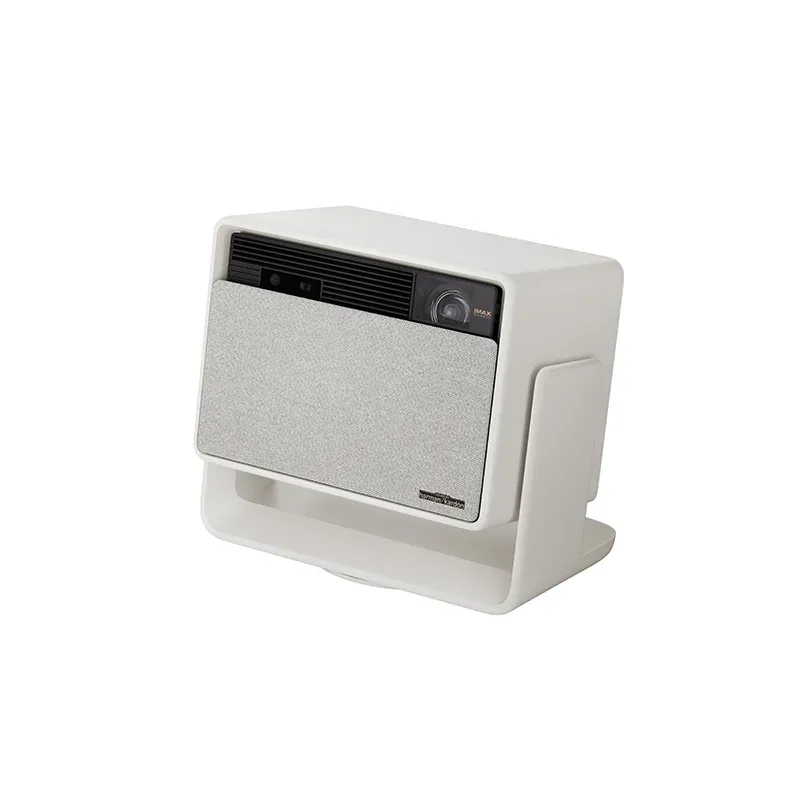
Horizon S Max

SKU 63158
AU$4 299.00
Price incl. GST (10%) AU$390.82
In stock
1
Share this product with your friends
Horizon S Max
Product Details

Max Performance, Max Entertainment

  • IMAX Enhanced & Dolby Vision Certified
  • Dual Light 2.0
  • SGS Certification More Comfortable Viewing Experience
  • Built-in Flexible Stand
  • 360° Surround Sound Theater-quality Audio

Description

HORIZON S MAX
HORIZON S MAX
HORIZON S MAX
HORIZON S MAX
HORIZON S MAX
HORIZON S MAX
HORIZON S MAX

Product Notes:

1. This product is IMAX Enhanced certified.


2. Dolby Vision Certification Number: #724097.


3. Brightness (light output) will vary depending on usage conditions. White light output is measured according to ISO 21118. The nominal value represents the average value of mass-produced units and is tested under ideal laboratory conditions in Performance Mode/High Power Mode. In Performance Mode, the highest brightness is achieved, which may result in some color differences compared to the default viewing mode. Additionally, the fan speed may increase, potentially causing noise. This is normal. For regular viewing, it is recommended to use other brightness modes.


4. Based on the data from XGIMI Laboratory tests, this product’s color gamut area ratio is 110% under the BT.2020 standard.


5. SGS Professional Color Accuracy Certification Number: PT-23-000-201410. The typical value of ΔE<1 for color accuracy in the factory production of XGIMI HORIZON S Max is obtained from the XGIMI Optical Laboratory. The calibration parameters will take effect when the high color accuracy mode is correctly activated in the system. Color accuracy may vary slightly depending on factors such as projection usage time and lab testing equipment. Please refer to your actual experience for an accurate assessment.


6. Refers to dynamic contrast ratio.


7. Low Speckle A+ Certification Number: PT-23-000-401900; Low Color Breakup Ratio A+ Certification Number: PT-23-000-401940.


8. To ensure accurate calibration, the side throw angle should not exceed 40° (degrees). The display quality may vary based on product usage habits and environmental conditions. When using Uninterrupted Auto Keystone Correction, you need to disable the “Intelligent Screen Alignment” and “Intelligent Obstacle Avoidance” functions in the system settings; due to the complexity of the environment, Uninterrupted Auto Keystone Correction may fail, and manual correction may be required.


9. Due to environmental complexities, Intelligent Obstacle Avoidance does not guarantee the avoidance of all obstacles.


10. For the projection image to automatically fill the entire screen, it must cover the entire border of the screen. To ensure a comfortable aspect ratio, non-16:9 screens may not be fully covered. It is recommended to use a screen with a black border around the edges to improve recognition accuracy.


11. The Wall Color Adaption feature needs to be enabled in the system settings to take effect. Once activated, it can calibrate the picture based on wall colors with a color temperature ranging from 3000K to 15000K. However, the calibration effect may vary depending on the wall color. For optimal results, we recommend using it in dimly lit environments.


12. The Eye Protection function can be enabled or disabled in the system settings.


13. The Ultra-wide Screen Mode feature needs to be enabled in the movie settings. It is applicable to local video sources with a 21:9 format and can only be supported during side projection.


14. The data related to speakers comes from the XGIMI Acoustic Laboratory.


15. Android TV is a trademark of Google LLC.

* Actual product features and specifications (including appearance, color, and size) and actual display aspects (including backgrounds, interface, and icons) may vary by country. Please consult the point of sale for further information.

* All performance data in the preceding pages are theoretical values obtained by XGIMI internal laboratories through tests conducted under particular conditions. Refer to the aforementioned product details for more information on the specific testing conditions. Actual performance may vary based on individual product configurations, software versions, application conditions, and environmental factors. All data is subject to actual usage.


* XGIMI is committed to providing accurate product information. However, due to subsequent changes involving product batches, production, and supply factors, it may be necessary for XGIMI to make changes and adjustments to text and images. Rest assured, these changes are made to match the performance, specifications, indexes, and components of the actual product. Product information is subject to such changes and adjustments without notice.


* Operating temperature: 32°F to 104°F


* All parameters listed on this page are measured in an XGIMI internal test environment for mass production. User experiences may vary in different settings, usage conditions, software versions, etc. Please check the official XGIMI website for detailed test standards and data.


* The product includes a printed manual. However, the electronic manual will be updated on the XGIMI website. If there is any discrepancy or conflict between the printed and the electronic manual, please refer to the latest electronic manual on the official website.


* We advocate for environmental sustainability and paper conservation. For instructions in various languages, please scan the QR code of the printed manual or download the electronic version. If you have any questions during use, please contact us via info@xgimi.com.au.

Our Servers

Community Consumer Electronics Technology Expert

Start a Repair Quote

We’re here to help. Certified repairs are performed by trusted experts who use High Quality Parts, you’ll get your product back working exactly the way it should.

Shop Online

Shop Consumer Electronics products with us: Laptop; Desktop; Mobile Phone; Tablet; Accessories; Office IT Supply; Smart Home; Refurbished Devices.

Enterprise IT Solution

B2B Software and Hardware Solution. We Provide Professional Servers; High Quality Products and Robust Solutions to our business partner.

Our Store Locations

Find Your Nearest Leon's Tech Store
Leon's Tech Hyperdome

Leon's Tech Hyperdome

Shop 9 (Kmart) Hyperdome Shopping Centre, Loganholme QLD 4129

Leon's Tech Carindale

Leon's Tech Carindale

Westfield Carindale, Shop 2004, Level 1, Near Woolworths

Leon's Tech Chermside

Leon's Tech Chermside

Shop 233 Westfield Chermside, Chermside QLD 4032
Leon's Tech Bulimba

Leon's Tech Bulimba

162 Oxford St, Bulimba QLD 4171
Leon's Tech Albany Creek

Leon's Tech Albany Creek

Woolworths Market Place, Old Northern Rd &, Albany Forest Dr, Albany Creek QLD 4035
Leon's Tech Birkdale

Leon's Tech Birkdale

Fair Shopping Centre 2, 4159 Shop/12 Mary Pleasant Dr, Birkdale QLD 4159
Leon's Tech Bracken Ridge

Leon's Tech Bracken Ridge

Shop 14 ( Leon’s Tech ), Bracken Ridge Plaza, 250 Telegraph Rd, Bracken Ridge QLD 4017
Leon's Tech Greenslopes

Leon's Tech Greenslopes

700 Logan Rd, Greenslopes QLD 4120
Leon's Tech Hope Island

Leon's Tech Hope Island

99 Broadwater Ave Shop TD.01B Hope Island Marketplace, Hope Island QLD 4212
Leon's Tech Underwood

Leon's Tech Underwood

2/3287 Logan Rd, Underwood QLD 4119
Leon's Tech Runaway Bay

Leon's Tech Runaway Bay

Shop GF019C, Runaway Bay Centre 10-12 Corner Lae Drive & Bayview Street, Runaway Bay, QLD 4216

Get in Touch

As a Professional IT Provider based in the Brisbane and the Gold Coast, with a decade of experiences in Mobile Phone; Tablet & PC Repair and Accessories Sales, Custom Gaming Desktop & Work Station, Providing Software and Security Installation Services. The key to our success is our focus on establishing and developing strong and long-term relationships with our business partners to accelerate their growths and deliver superior technology solutions to our customers.

Warehouse & Head Office

2/3287 Logan Rd, Underwood QLD 4119

0412 183 876 / 1300 678 252

Contact Us